Saturday, September 15, 2018

Achieve: JavaScript Servlets on Node.js

Achieve is a modern HTTP server that runs on Node.js and uses JavaScript Servlets to initiate back end processing. (npm, github) JS Servlets are fast, very easy to use, and do not limit your ability to develop sophisticated back end applications; perfect for rapid development of microservices or complete Node.js based web applications. You can even use it just to serve web pages.

A servlet is a small program that runs on a server. The term has long since been associated with Java. Java Servlets provide the interface between servers and back-end application programs written in Java. This new server implementation, named Achieve, provides a JavaScript Servlet implementation on Node.js. If you are familiar with Java Servlets, you should easily see general similarities in the new JS Servlet design.

The initial motivation for Achieve was to include web application development in early programming courses (including web development courses). Ease of use, especially in exchange of utf-8 text (the default for HTML5) was an absolute requirement. JavaScript was an obvious choice of language.

A variety of considerations motivated use of the servlet concept, inspired by Java servlets. Reading through the quick-start guide, you will see that with the special features of JS Servlets, Achieve is very easy to use. But no one should be held back by tool limitations. Ease of use is a feature, not a limiting characteristic. The JS Servlet Context object, along with full access to Node.js and all the node modules that exist provides a path to a complete professional experience. Finally, early experience with Achieve makes it easier to introduce Java Servlets in a later course.

Real Developers Don't Need Unnecessary Complexity! As work proceeded on Achieve, it became clear that the implementation was efficient enough for production. In addition, its basic features would be helpful to developers as well as students.

  • Achieve leaves application components loaded in memory as would be expected in production, BUT automatically reloads them when the code has been changed.
  • Achieve delivers error messages for display in the browser or browser console in the same form as errors in browser code, allowing one point of focus during development and test.
  • Achieve can handle the entire process of returning a response handed back to it through the servlet's return statement.
  • Achieve default is utf-8 plain text, but you can change the MIME type and encoding (in fact, set any header) and still use the servlet return statement, allowing Achieve to finish the response.
  • You can set the application folder to any directory you have access to (including network directories) and set a subdirectory for the root application.
  • You can take complete control, as in any Node.js application, via access to the request and response in the servlet's Context object.
  • You can list the MIME types currently supported by Achieve and add other MIME types as needed.
  • Achieve supports browser caching (ETags) and compression (gzip,deflate).
  • You can build back-end applications with Achieve in combination with other node modules.

A Separate Servlet Container! JS Servlets alone can, in some circumstances, be a good choice for running microservices. Module servlets.js is the servlet portion of Achieve. It is Achieve without the static content server code. Although this may increase speed when speed is critical, the following should be considered when making a choice.

Because servlets.js is the servlet support portion of Achieve, you can develop using Achieve and switch to servlets.js in production.

Achieve allows microservice developers to work independently through unit testing, leaving integration to a time when other components are well developed. Triggering back-end processes through your browser is easy to do and the way Achieve delivers error messages to the browser can help you debug. This simplifies the development process by allowing focus on one thing at a time. You can easily develop monitoring tools for your microservices with the browser as the GUI. Achieve runs through the serve vs. run decision quite efficiently. If you really feel the need to trim microseconds through coding, you probably need a faster computer.

Achieve and servlets.js were developed as part of the High Level Logic project (HLL). They are both available via npm and github, free and open source under MIT license.


Monday, August 13, 2018

Achieve Node.js Server with JavaScript Servlets


Achieve Node.js Server with JavaScript Servlets

Achieve is a modern HTTP server that runs on Node.js and uses JavaScript Servlets to initiate back end processing.[1] (npm, github) JS Servlets are fast, very easy to use, and do not limit your ability to develop sophisticated back end applications; perfect for rapid development of microservices or complete Node.js based web applications.

Some Servlet features: The servlet container handles text responses. You simply send a result back using a return statement in the servlet. When you change your back end programs, they are automatically reloaded. No need to restart the server every time you make a change. If there is an error in your application code, you receive a very informative error message - without crashing the server. When using XHR, error messages can be displayed in the browser's inspector-console just as errors in browser code do.

You can also take control of the response via the Servlet Context to, for example, set headers and return blobs.

Achieve is easy to install and run. No dependencies. Requires Node.js v8.1 or later. (Developed / tested with v8.9.4)

From beginners:

  • You do not need to know anything about Node.js.
  • You can Achieve as you are learning JavaScript.
  • You can write back end apps without knowing HTML or CSS.
  • Recommended for use in early web development training.
  • Recommended for use while learning JavaScript.
  • Recommended for early training in other web related technologies such as database.

To advanced users:

  • Excellent development features.
  • Fast enough for production.
  • Take control through use of the Servlet Context.
  • Apply advanced JavaScript and Node.js knowledge.
  • Use other Node.js modules in your applications.

Regular HTTP features:

  • Delivers static content.
  • Unlimited MIME support.
  • Runs back-end JavaScript programs (via JavaScript Servlets).
  • Supports defaults index.html, index.htm, index.js
  • Supports browser caching. (ETag)
  • Supports compression with ss caching. (gzip,deflate)

Special Features:

  • No knowledge of Node.js required to start using JS Servlets.
  • Little knowledge of JavaScript required to start using JS Servlets.
  • Servlets handle HTTP Response. App just uses return statement.
  • Useful app error reports can be displayed in browser console.
  • Automatic reload of modified files.
  • Servlet Context Object allows developer to take complete control.
  • Node.js environment configuration. (development,production)
  • Configurable apps folder path and path to the ROOT application.

Quick Start Tutorial

First: Install Node.js (LTS recommended), version 8.1 or later. (Make note of your install directory.)

Running Achieve (simplest form):


const server = require('achieve');
server.setAppPath(__dirname);   // Sets the application directory to wherever this program is saved.
server.listen();  // defaults to port 80 .. change it to something else if you wish
Copy the code above and save it to a directory that will serve as the root for your applications. You can call the file server1.js.
If you need to use a port other than 80, include the port number as an argument to the listen() method. (exp: server.listen(8989);)

Open a command window (cmd) and cd into your application directory. On the command line, type the following:

npm install achieve

At the end of npm's actions and commentaries, you should get something like this:


    +achieve@1.0.5
    added 1 package in 7.281s

In your console, change directory (cd) so that you are in the directory where your server.js (code above) is saved.

Start the server:

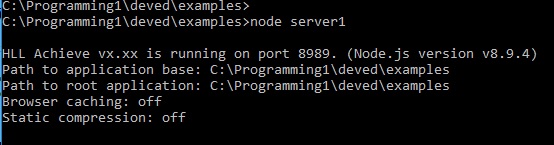
Type "node server1" (assuming you named the file server1.js). You should get a response:

You are ready to serve static content. (html, css, javascript for browser) We will do that in a minute. Let's start instead with a simple example of a JavaScript Servlet.

Hello World Servlet:


// Save this code in file index.js in the apps directory ("application base" - directory where you are running the server)
exports.servlet = function (context) { return "Hello World!"; // Achieve handles the response. }

In your browser's address bar, enter http://localhost:8989 (assuming port 8989). The text "Hello World!" should appear. Now, without restarting the server; change the text in your servlet to, for example; "Hello There World!" Refresh the page. Achieve will detect a change and reload the file. Servlet caching works pretty much the same way browser caching works. The cached version will be used as long as the file hasn't been changed.

When the file name is not given in the URL, Achieve searches for index.html, index.htm, and index.js; in that order. If it uses index.js, it will run the servlet on the server and return the result. You can achieve the same result by giving the name of any JavaScript Servlet file without the .js extension. In this case: http://localhost:8989/index Including the .js extension corresponds to a browser's request for a resource. http://localhost:8989/index.js will serve the file instead of running it.

Achieve will also return helpful error messages to your browser's console. First, let's receive an error message to the page. Modify your servlet to cause an error by deleting a few characters from the end of the return statement: return "Hello World. Refresh the page.

To see how to receive error message in the browser's console, save this HTML file and save it to your apps directory as index.htm. Open the inspector in your browser and click on the console tab. Then reload http://localhost:8989 On the browser side, the trick is in the callback() function. If the response status is not 200: console.error(this.responseText); This is a feature supported by Achieve. Note also that the URL specified in function runServlet() is "index", without the .js extension.

Access parameter values that were sent with the request:


    var myParm = context.parms.myParm;  // or
    var myParm = context.parms['myParm'];

Running Achieve with options:


const server = require('achieve');

server.setAppPath("c:/myachieve/myapps");                // set root directory for all applications
server.setRootDir('root');                               // set a subdirectory under the root directory for THE ROOT application
server.setCaching(true);                                 // turn browser caching support on
server.setCompress(true);                                // compress static resources
server..showMimeTypes();                                 // Show the current list of supported Mime Types
server.addMimeType("xsl", "application/vnd.ms-excel");   // add an unsupported mime type
server.setNodeEnv("development");                        // set Node environment 

server.listen(8989);  // listens on port 8989

Servlets can use other functions:


exports.servlet = function (context)  {
  return hello();
}
function hello ()  {
   return "Hello World!";
}

Servlets can use functions in other files.


// in otherfile.js
exports.hello () {
  Return "Hello World!";
}

// in myservlet.js
exports.servlet = function (context) {
  var other = context.load("otherfile.js");  // Extends servlet features to otherfile; reloads if cache is stale.
  return other.hello();
}

The Servlet Context

You can use the Servlet Context to take control of your back end process. The Servlet Context contains:


  context.request    // The session request object.
  context.response   // The session response object.
  context.parms      // Parameters sent with the request
  context.dirPath    // The current application path on your computer
  context.load       // The JavaScript Servlet load() method (see above)

TO DO List

  • Support 3rd party logging modules (developer's choice).
  • Test HEAD method.
  • Separate the Servlet Container and make it available on its own.
  • Netbeans support?
  • HTTPS
  • CORS support?

Future

  • Integrate HLL Websockets.
  • Complete and integrate HLL intelligent application framework.

Footnotes

1. There is also a module that provides servlet support only; i.e. without serving static resources: servlets.js is the servlet container that is an integral part of Achieve. It might be your choice if you want to build microservices on Node.js using another server for static content. Achieve is still recommended at least during development, as it allows you to easily use the browser with XHR and integrate later - parhaps using servlets.js instead. Note however that Achieve gets through the "serve or run" question efficiently and it is sufficiently light weight that you might end up sticking with it.


Monday, September 11, 2017

The dangers of fake AI

Visit the High Level Logic (HLL) Website
— Home of XPL (eXtensible Process Language)

It's like XML, but you can store source code in it.

What's worse than media hype about robots taking over the world? Ideas that over-hype the character and promise of AI have slowed its progress several times. Irresponsible journalism leads to great expectations that cannot be fulfilled fast enough. People lose faith in the effort. Research funding dries up. Entrepreneurs can't find interest. Now we have a new villain; con artists selling fake AI.

All the big companies, like IBM and Apple want to be seen as leaders in the field. The marketing departments of even those companies with humble technological beginnings like Facebook, a “social media company”, Google the search engine company and Microsoft, the perpetual follower want in on the deal. It suggests that they're on the cutting edge. Even people like Elon Musk want to be players. But wait, there's more.

If you've applied for a job in the modern era, you might have done so by filling out a long form on the Internet. It's then possible that you didn't have a chance because you never got to talk with a real human that had a clue what the job was actually about – one that you were perfectly suited for. That's an example of automating beyond the abilities of modern software (and programmers, and the people who planned and paid for the system).

The fact that a lot of automated software doesn't work well hasn't stopped the developing companies from selling it or customer companies from using it – no matter how much it hurts them. I think the above example is a good one. An automated system that delivers a biased and narrow view of which applicants should be interviewed; based merely on the fact that the software in the process is dumb, costs the hiring company a lot. They don't end up with the right people to do the work, grow, and prosper – certainly not to be competitive.

So what solution can the marketing department in Crap Software, Ltd. find to fix the problem of having crappy software that isn't really up to the job? The popular answer nowadays seems to be by pretending that it's AI. Not that the people in the marketing department know what that is really. But it's a popular buzz word that suggests something new – not that same old crap they were trying to sell last year. Except often enough, that's what it is.

From automating personnel software to working out who should be kicked off of Facebook to various schemes in customer processing and satisfaction ideas and onto a range of other human decisions that require effort; there are liars out there trying to sell “solutions” by pretending that the same old disappointing software they were selling last year is now smarter than you. Or at least that it's now suddenly, magically, up to doing a competent job so that humans don't need to – even though it's not.

Saturday, May 23, 2015

Routine Logic: An Example

Visit the High Level Logic (HLL) Website
— Home of XPL (eXtensible Process Language)

It's like XML, but you can store source code in it.

In the short comment "Routine Behavior" August 8, 2011, I argued that:
... semi-unconscious or even unconscious routine behavior can be somewhat sophisticated - probably moreso than we might first imagine. It's as though our brains want to suppress thoughts about routine logic. There may be a very logical explanation for why it would - to keep us from being overwhelmed - to make our thought -> action responses more efficient. That's a classic explanation that I believe can be applied to a higher level of logic than has been associated with unconscious thought before.
I think the following video provides some food for thought on this topic.


Monday, February 16, 2015

Artificial Intelligence, XML, and Java Concurrency

By Roger F. Gay
Visit the High Level Logic (HLL) Website
— Home of XPL (eXtensible Process Language)

It's like XML, but you can store source code in it.

Source code that will be processed as XML in automatic programming applications is created and maintained as XPL (eXtensible Process Language). XPL is structured just like XML, but the parser allows XML's special characters (<,&,>,",') in text elements. This provides a distinct advantage when dealing with source code. Running the transformation to XML concurrently is one of the tactics used to eliminate the performance cost of preprocessing.

Background

The High Level Logic Project began with thought experiments in the early 1980s that were motivated by bottlenecks and performance issues in the first large-scale artificial intelligence commercialization efforts. The result is a very high level framework, written in Java, for simplifying development of high-performance intelligent distributed systems. The project is now in its early commercialization stage.

XML has been a critical technology in the project. For example; software component re-usability is encouraged by allowing customization through configuration rather than rewriting programs. (Like configuring server applications.) And as in many modern projects, XML is also used to communicate between distributed systems. XML processing is well-supported in popular programming languages and familiar to a large number of professional programmers; critical considerations in developing a commercially viable framework. Using XML as much as possible also means re-using processing components more often, contributing to a fast, efficient, light-weight system that is easier to build and maintain.

AI and XML

Artificial intelligence processing quite often involves treating logic as data. This allows a program to “think about” what it's doing, so to speak, and make changes on the fly. In some cases, this involves actually storing source code snippets as text data, configuring its use on the fly, and then either interpreting the code or pushing results into an automatic programming process that compiles.

XML is almost a perfect match for storing code snippets as text. Aside from being well-supported and familiar, tag names can match handler cases, namespaces can instantly deal with some elements of context, and attributes can provide information on special processing requirements (types, etc.) among other things. It would be great then to store source code snippets in XML text elements. But that runs us directly into XML's special character handling problem.

Source code is packed with the “special characters” (<,&,>,",') that XML reserves for XML related processes. XML was designed for markup, not code storage and processing. We need something more convenient; something that allows source code storage in its common, unmodified form without making files bulkier, less readable, or harder to maintain. Yet, for the reasons given, we do not want to abandon XML.

XPL, like an XML for Source Code

Wouldn't it be nice if we had an eXtensible Process Language. XPL would look just like XML, but would not have special character restrictions in text elements. Yes it would, and now it exists. XPL is the High Level Logic Project's solution to the special character problem. XPL looks like XML, but allows special characters in text elements:

<?xpl version="1.0" encoding="utf-8"?>
<mycode xmlns="http://xmlns.hll.nu/rules" xmlns:xsi="http://www.w3.org/2001/XMLSchema-instance" version="1.0">
 <state name="dum1" type="int" value="3" />
 <state name="dum21" type="String" value="dum11" />
  <!--  My first rule  -->
  <rule>
    <if> dum1 <5 && dum1 > 1 || dum1 < 200;</if>
    <then>
      dum21 = "Unescaped special characters like '<' can be used."
    </then>
  </rule>
</mycode>

XPL processing uses a pull parser, in a process called StAX-PL (Streaming API for XPL) because it's like XML StAX (Streaming API for XML). Like StAX, StAX-PL is very fast and light-weight. StAX-PL is actually lighter than StAX because it supports fewer features. In simple processing, XPL can be used in place of XML. When full-featured XML processing is needed, StAX-PL is a preprocessor that produces valid XML. We almost have the best of both worlds then. We can store source code in XML structures without facing project crushing inconvenience.

Preprocessing in No Time Flat!

Performance issues have been a serious burden in wider use of artificial intelligence technologies. “Thinking” about thinking, reformulating, adapting on the fly. The additional complexity of AI can seriously slow things down. Commercial grade AI needs to both fit in with common systems development and perform competitively. Processing speed is a constant concern. XPL gives us the data form we need, but at the cost of additional process time. StAX-PL is very fast, but there are ways to eliminate the cost altogether.

In many cases, it will not be necessary to carry out preprocessing during live runs. If there is no reason to change the initial code data during a live run, then the valid XML can be generated beforehand. No need to burden the live run with preprocessing. In some of the automatic programming cases, not even the XML files are needed. Compiled programs are used during live runs. The process from XPL to compiled code is part of development (automatically done by the HLL development engine).

It seems as though the most common cases are likely to occur during development, maintenance, and end-to-end testing. Frameworks are created in the service of those activities, so this is reason enough to take extra steps to speed things up. Tool builders must also respect the fact that application developers and operators make final judgments about how things are run. Flexibility counts. We can take it as a general rule that speed is a good thing. (The project is also involved in use cases that incorporate real-time updates, but this is best left to a separate discussion.)

Using Java Concurrency

StAX-PL uses a pull parser. SAX uses a push parse process, in which input is pushed onto the SAX processing stack. These two processes work well concurrently. StAX-PL very rapidly pulls elements from the XPL parser and pushes them onto the SAX stack. Because the job StAX-PL does is limited, it is not difficult to keep ahead of heavier SAX processing. Even if the demands on SAX are relatively light, StAX-PL (like XML StAX) is quite competitive when it comes to speed.

The Java language and the JVM were designed to support concurrent programming. The technical details of the HLL implementation for Java 7 and Java 8 are not unique except in the use of StAX-PL as the initial source. The StAX-PL and SAX processes are run in separate threads with output from StAX-PL piped directly to SAX. (PipedOutputStream -> PipedInputStream)

Typical programmer timing estimates were made on an Intel dual core computer. System time in milliseconds was recorded before processing began and after it was complete. Tests included multiple runs in order to filter out system state differences. Separate times were taken for a complete (read process write) StAX-PL process and a complete SAX process and then compared with the concurrent StAX-PL / SAX process.

SAX processing was limited and approximately equivalent to StAX-PL processing. StAX-PL read and parsed the XPL file and piped elements to SAX. SAX received the valid XML elements in its stack, re-parsed them, and wrote summary information. All three processes (StAX-PL alone, SAX alone, and both together) took nearly exactly the same amount of time, confirming the success of Java concurrency in eliminating the performance cost of preprocessing.

About StAX-PL

An XPL developer suite is available from the High Level Logic Project. The suite includes source code for XPL processing and quick start source code for XML StAX, SAX, and DOM. The source code for concurrent StAX-PL / SAX is also included.

A FREE XPL command line tool is also available that produces a valid XML file from an XPL file.

Monday, September 30, 2013

Free WebSocket JavaScript Code and Tutorial

Visit the High Level Logic (HLL) Website
— Home of XPL (eXtensible Process Language)

It's like XML, but you can store source code in it.

By Roger F. Gay

WebSockets are finally coming of age. Implemented in most major browsers and promised soon by Microsoft, developers are itching to use native bidirectional (full-duplex) communication within their browser applications. No more cranky bloated work-arounds to do what obviously needs to be done in order to use browsers as a real application GUI. Along with that, comes a host of new functionality with HTML 5 and the already popular tricks of CSS 3.

Yet, because WebSockets are still quite new to most developers, the technology and how it is used still seems a bit mysterious to many. This tutorial should help lift the fog around what WebSockets are and how to use them in browser applications. All the JavaScript code in this tutorial is free and without registration. You will even have access to a live HLL WebSocket server to try it out on your own. (Note: Server is temporarily down.) If you've not yet learned to use WebSockets in browser apps, it's likely a lot easier than you think.

So, briefly, what the heck is a WebSocket anyway? Let's review a tiny bit of compressed history just to put things in context. Don't worry, you won't be tested on this section. Hopefully, you'll just find it a bit interesting and informative.

You've heard of HTTP. Functionally, that's when you click on a button and then sit and wait for a response while your browser is locked up. Then came AJAX, which solved the lock-up problem without ever leaving the world of point and click; also known as “request-response.” Request-response is the pattern you find in the vast majority of existing web pages. You click on something to get a response. You don't get information from the server unless you click to update. What if the server wants to send you some information without waiting for you to ask?

The desire to let the server communicate more freely has been so strong that there have been work-arounds for what became known as “push” technology. Still relying on HTTP, it was a trick. "Long-polling" is one of the techniques used to "push" information to browsers. The browser page is set-up to send a request to the server via AJAX. Then it just waits for a response. AJAX doesn't lock up the browser. You can continue to play in the page while AJAX waits. But you don't really need to do anything. Examples include email message notifications and stock price trackers that do not require that you click in order to update.

But enough goofing around, a group of developers finally said. Old-fashioned push work-arounds are inefficient and often cranky. What we really need is full-duplex that's easy for every app developer to use. That means browsers can receive messages from the server at any time, even if the browser is sending messages at the same time. Besides that, we can do this in a way that is much more efficient than old-fashioned HTTP. That latter consideration is a sign of our age. People care a lot nowadays about the amount of data being shipped around, and the efficiency of communication processes, much of which is wasteful. We just don't need repeated HTTP connections to maintain a communication channel. We can also implement message passing more efficiently. That's what they did with WebSockets.

Messages go either way at any time. So, for example, if you want to build a multi-player game in a browser, you can get updates based on what other players are doing at any time. No cranky bloat-ware work-arounds to get it done and no need to install special software on your own computer. WebSockets are supported directly by browsers. You have a browser installed on a variety of different devices, not just your PC. If it's up-to-date with WebSocket support, you're ready to go. And your small devices will love you for the efficiency of WebSocket technology. Faster action, less energy use, less heat.

Besides this tutorial, you can also look at a running demonstration in a more complex web page by following the link of my two year old blog article on the original HLL WebSocket demo. When you get to the demo, you can click “Download HTML source code” at the top if you wish, but the demo code you find there needs to be run under an http server. And you can look at my previous article running a simple game using the HLL WebSocket server to drive one of the game characters. Christian verses Flying Spaghetti Monster - HTML 5 Games, WebSockets, and AI

The part of any of the demos that actually addresses WebSocket communication is very similar to the tutorial code. It's always that way. It doesn't matter where you get your JavaScript code or how it's built into development tools and frameworks. Browsers do the technical heavy lifting. Application developers use the browser's capabilities through a few simple-to-use methods.

OK, so let's get to the meat of the tutorial. I'm going to show you how to set-up the JavaScript in any browser application to make use of WebSockets. I'll give you all the code in this tutorial. I'll give you the direct explanation and you should see how really simple it is. The full code for this tutorial is here. You can simply copy-paste it into a text editor and save it to your computer using a name with an .htm or .html extension (Windows: File Type "All Files" and explicitly type the whole file name, including extension) and then click on the file to run it. You should see some text spill out onto the page very quickly.

The tutorial program will automatically connect to the WebSocket server, send a message to it, receive a message from it, and then disconnect. So, basically, it goes through all the basic steps in WebSocket communication, posts messages to you on the html page as it goes along, and then stops. I'll also explain where to alter the code for your application.

Just for completeness, let me explain that the tutorial code is written in HTML 5; that is, any browser with HTML 5 capabilities sees it as such. Here's why.

<!DOCTYPE html>
<html>

That's it. Declaring doctype html simply, means to all modern browsers that the code within can be interpreted according to the most up-to-date standard.

Now let's go through the code. At the top of the tutorial application, you'll see a few variables defined and a simple initialization function.

var wsUri = "ws://isr.servequake.com/echo";
var output;
var websocket;
var connected=false;

function init() {
 output = document.getElementById("output");
 doConnect();
}

wsUri provides the IP address of the HLL WebSocket server used in this tutorial, with its application name “echo”. It will become apparent as we move through the tutorial that the variable “output” is used for printing text to your page, “websocket” is a variable that will be used for the WebSocket object, and “connected” just keeps track of whether we're connected (true) or not (false).

The function init() is automatically called when the page is loaded because of a line of code at the very bottom of the JavaScript section: “window.onload = init;” (When the page is loaded, call init().) init() sets the value of “output” to a <div> at the bottom of the html page. That's where the text will appear. It then calls function “doConnect()” whose name gives away at least part of its purpose. doConnect() is actually simpler than it might first appear. I will explain.

The doConnect() function is the most complicated part of the tutorial; and yet, when you get through it, you'll look back and wonder how it could be so simple. By the time you've finished the tutorial, you'll know why. Scan through it and then read the detailed explanation below.

function doConnect() {
 if (connected) {
   writeToScreen("<span style="color: red;">You're already connected!</span>");
 } else if (typeof MozWebSocket != "undefined") {
   websocket = new MozWebSocket(wsUri);
 } else if (window.WebSocket) {
   websocket = new WebSocket(wsUri);
 } else {
   writeToScreen('<strong style="color: red;">ERROR: This browser does not support WebSockets.</strong>');
   return;
 }
 websocket.onopen = function(evt) { onOpen(evt) };
 websocket.onclose = function(evt) { onClose(evt) };
 websocket.onmessage = function(evt) { onMessage(evt) };
 websocket.onerror = function(evt) { onError(evt) };
}

Within all the conditions, look for “websocket = new WebSocket(wsUri);”. This is how you tell all the most up-to-date browsers to make the connection. As you saw above, the argument “wsUri” is the address of the WebSocket server application. Let me go over the necessary distractions above.

if (connected): I simply want to know first if we're already connected. If we are, the tutorial app says so. No need to connect again.

typeof MozWebSocket: “MozWebSocket” has to do with the integrity of the Mozilla browser team. There are browser versions that support development versions of WebSockets. These don't conform to the final finished standard and as active members in guiding development of the standard they also did some of their own experiments. They didn't want to confuse anyone by calling any of those things WebSockets, so they called them MozWebSockets instead. By leaving this condition in, even some older versions of Firefox should still be able to run the tutorial; but not if they're too old.

if (window.WebSocket): What you're looking for in up-to-date browsers is whether they support standard WebSockets in a standard way and this test can be given simply as “if (window.WebSocket)” (or if ("WebSocket" in window)). If the three tests fail, then the browser doesn't support WebSockets. We could do something then beyond simply sending a strong message about the old browser. We could initiate a fall-back such as long-polling or, perhaps more wisely, provide information about getting an up-to-date browser.

The final four lines in doConnect() are telling your browser session what to do when certain events occur. These events are connection opened, connection closed, message received from server, and error occurs. Each corresponding standard event, onopen, onclose, onmessage, and onerror, is attached to the “websocket” object that was defined just above in “websocket = new WebSocket(wsUri);”. We then specify what “handler functions” are called when each of these events happen. (“Handlers” handle the events … doing whatever you program them to do.)

“websocket.onmessage = function(evt) { onMessage(evt) };” for example, says that says that when a message comes in from the server, call the onmessage event handler function named onMessage(evt). “evt” is an object containing the incoming message.

Once doConnect() is complete, we have a running WebSocket connection, ready to send and receive messages until you close the connection. The tutorial program is set up to automatically run through three more of the events; sending and receiving messages, and closing.

function onOpen(evt) {
  connected = true;
  writeToScreen("CONNECTED");
  doSend("WebSocket rocks!");
}

onOpen(evt) is one of the event handler functions specified in doConnect(). Now that we have attached it to the websocket object, it will be automatically called by the browser when a connection is made. So, when your connection is made, the three things that I have programmed into the tutorial onOpen(evt) function will happen. (In your app, you can program it to do whatever you want it to do.) First, the variable “connected” will be set to true. Second, the word “CONNECTED” will be written so that you will know that you are connected. And third, it will send a text message, “WebSocket rocks!” to the WebSocket server, using the function doSend(). (As far as I know, Kaazing made the phrase “WebSocket rocks!” popular among WebSocket nerds like me. I also believe that Kaazing was the only organization with a final standard WebSocket server before HLL.)

function doSend(message) {
 writeToScreen("SENT: " + message);
 websocket.send(message);
}

doSend() is not a WebSocket event handler. It is a function that sends messages to the server at your command. Call this function (written as you wish) any time you want to send a message to the server. The tutorial function doSend() writes the message for you to see on your web page, and then calls the standard, browser supported websocket.send method with the message as the argument. That's it! That's how messages are sent from browser applications. … send(message);

At the server end of the tutorial application, the response will be a message sent back. I always feel a little funny at this point in the simplest demonstration of WebSockets. This is after all, a request-response pattern that could be done with AJAX. OK, so you can use WebSockets for things that have been done using AJAX. But of course, that's not all you can do. The server can send messages any time that it wants to. The WebSocket onmessage event handler function is always waiting to receive and perform in full-duplex. Nope, AJAX doesn't do that. AJAX is asynchronous HTTP. It needs a request in order to send a response.

function onMessage(evt) {
 writeToScreen('<span style="color: blue;">RESPONSE: ' + evt.data+'</span>');
 websocket.close();
}

The tutorial's onMessage(evt) message event handler function simply writes the message from the server to the browser display, and then it calls the browser method websocket.close(). Note that “evt” is, in this context, an object containing the message from the server. The actual text message is accessed from “evt.data”. Again, just to be sure there's no confusion here. Unless you're writing a chat application, you're going to want something different to happen in response to message events. Put whatever application code you need inside the event handlers.

function onClose(evt) {
 writeToScreen("DISCONNECTED");
}

The browser will understand when the connection has been closed and will automatically call the onclose event handler, onClose(evt), which will simply write “DISCONNECTED” to your browser display.

Hopefully, you've seen all this happen very quickly without ever seeing what onError(evt) does.

function onError(evt) {
 writeToScreen('<span style="color: red;">ERROR:</span> ' + evt.data);
}

If you do get an error, you will be told about it in your browser display, in red text.

Let's summarize and take in how simple this all is. You connect and tell the browser about your event handler functions. You also have a send function that uses the browsers websocket.send() method. When an event occurs, the related event handler functions are automatically called to do whatever you've programmed them to do. As far as browser-side WebSocket communications are concerned; you make the connection and then go about the simple business of sending and receiving messages, at any time, in no particular order, as much as you like. The rest of your coding is application specific.

Wednesday, September 25, 2013

Christian verses Flying Spaghetti Monster - HTML 5 Games, WebSockets, and AI

Visit the High Level Logic (HLL) Website
— Home of XPL (eXtensible Process Language)

It's like XML, but you can store source code in it.

By Roger F. Gay

Three demo games with WebSockets presented; the first is an HLL original. Use WebSockets for multiplayer games, AI from a server, or just because you can (replacing http in some cases).

HLL and HLL WebSockets are ripe for game development. I have so far done a simple proof of concept controlling a Construct 2 sprite via WebSocket, and this article presents a from-scratch HTML 5 PC game with WebSockets. To run it, your browser needs to support HTML 5 and WebSockets. An up-to-date version of Chrome seems to give best results even if your graphics driver might be a bit old. I've also run the demo on up-to-date versions of Firefox and Safari.

My goal in this round of activity is to bring HLL technology to game developers, many of whom are not programmers or spend enough time designing and building games that they just don't need a lot of programming overhead in their process. The objective with this game was simply to build a game from scratch, my first time. I learned a great deal in the process and have a much stronger vision of how to achieve the goal.

The game: A man tentatively named "Christian" is your character. He's a simple stick figure humanoid that can walk in one direction (right arrow key), raise and lower one of his arms (up and down arrow keys), and fire commands (enter key). Well aimed commands are a defense against being taunted by the Flying Spaghetti Monster.

Click on screen-shot to play the game.


Explanation:

The Flying Spaghetti Monster (FSM) is not of this world. His "mind" actually resides on the WebSocket server. I decided to use an autonomous AI (no matter how cheap) instead of building a multi-human game demo because there's no guarantee that another human will be trying the demo when you are. The autonomous FSM will be there at any time anyone looks at the demo.

FSM shows up when his distant remote self decides to visit you. (Actually a simple random timer, set between 0-8 seconds.) He also decides beforehand (on the server) which taunting behavior he will use and how long the taunt will last. And because he's also acting as a substitute human player, news is sent back to the server to let him know he's been hit and he withdraws in acknowledgement.

It's a quick demo game to be sure, but includes some basic essentials; the infamous (or at least a) game loop (with good clean CPU use characteristics), independent motion and control of characters, background movement, etc. I'm interested in simulating humanoids, so I created a very simple walking stick figure as the first tiny step toward that end. I'm not an artist, so feel free to laugh at the man as long and as hard as you want.

The point is that FSM is an external player that moves in and interacts without the old familiar need to click for an update. This is the great tactical advantage of WebSockets. In addition, WebSockets transmit data much more efficiently than normal HTTP. (So much so, that you'll help the Internet work better and reduce energy use by switching to WebSockets.)

The second game I'll mention here was presented as a demo with WebSockets by Mozilla at least a year and a half ago; created by Little Workshop website development company. You will be able to play alone if there doesn't happen to be anyone else trying the demo when you are.


Finally, have a look at Nomo Racer from Hungary. It was developed using MIT open source WebGL tools. (You'll need a modern browser that supports WebGL as well as WebSockets. If you've been ok so far, they give it a try.) "The aim in creating this game," according to the Nomo Racer Facebook page, "was to see what the WebGL and WebSocket technologies are capable of, and find out whether these tools could provide real-life solutions."

The WebSocket connection seems to time out when you're not playing and I found steering difficult using the arrow keys. But it's an impressive experiment / demo nonetheless. I also found a YouTube video showing two cars racing (multiplayer capability), with a driver who could steer better than I could. :)


There are actually a number of other game demos using WebSockets out there. Perhaps I will highlight them in this blog at a later date. But as you can see, there are a number of people demonstrating a range of games using WebSockets.


Monday, September 2, 2013

Riding New Ground (Part 1): Web Browser Application with HTML 5, CSS 3, JavaScript, Microdata, and Mopeds

Visit the High Level Logic (HLL) Website
— Home of XPL (eXtensible Process Language)

It's like XML, but you can store source code in it.

This is part 1 of a tutorial, or commentary at least, related to my recent experience building the Mopedum Webshop. The software is licensed for Mopedum's use and may be generalized and put into an open-source project by the HLL Project. Aside from title technologies, Tomcat, Java, and database systems have also been used, and I will comment about listings in search engines like Google. But the real breath-taking game-changer right now is in web pages; HTML 5 and dynamic coding that uses the browser, without applets, as a real application interface. I think we should talk about that.

Part 1: The Job

The webshop was built for a small business in Nynäshamn, Sweden that features a nostalgia museum, nostalgic café, nostalgic music and other events, retro boutique, and an art hall. The grand opening of the museum, which focuses on “the golden age of mopeds 1952-1979” (and contains much more than mopeds, providing a nostalgia trip through the era) took place on May 26, 2012. Throughout the entire day, the crowds overflowed onto the front deck of the renovated old community bathhouse and sidewalk, reflecting both a strong national interest in "veteran" mopeds and quite possibly the special appearance of Swedish pop icon “Lill Babs” Barbro Svensson. (Image with The Beatles: 1963) The café was also packed throughout the evening for the after-party.

The facility also includes a workshop for stripping down mopeds and preparing parts for sale as well as a stock room and a part-time sales and shipping office. Recycling at its best!

For confused American readers, let me explain the importance of mopeds in Swedish cultural history. While you drove a car to Blueberry Hill to find your freedom, mopeds gave greater freedom of movement, allowing a range of activities, to Swedes and other Europeans during the “golden age.” No wonder then that a nostalgia museum built around this theme would be a hit or that it won a best contribution to local culture award after its first year. It's no wonder that there are active veteran moped clubs throughout the county and no wonder that this small business invested in 40 metric tons of old mopeds and parts.

With that as background, creation of a moped parts web shop became my slow-season winter project while others spent time preparing parts and entering information into an existing sales-system database. It was a completely custom project. Except for some occasional copy-pasting (come on, we all do it), everything in the web pages, XML files, and Java programs was typed character by character into a text editor. Java programs are written in SE 7 (plus javax.servlets). I am a tool builder who doesn't believe in relying much on other people's tools. I want efficient cutting-edge code. I want to fiddle with details myself and even blog about things. :)

Web shops are supported on some hosting sites and there are open-source web shop projects. At first glance, it may seem unreasonable to put a small business through a from-scratch custom software project. The first suggestion of a custom project came from the need to use data from their legacy database system, which is tied to their sales system, which is an nondetachable part of the business operation. They had been using the system for sale of food and drinks in the café, boutique items, and tickets to the museum. There were no plans to structure product data for a sophisticated drill-down such as is normally supported by manufacturers and distributors of new parts; for example: category → brand → model → subsystem → parts + alternatives and related items. For best results, perhaps even just useful results, design needed to be tailored to the details and character of the actual available data.

I decided that I wanted to build web shop technology anyway and offered a license arrangement involving minimal support when I worked, extended into improvements and support after the system went on-line. With “We Are the Champions” playing in the nostalgia café (really, it was and still regularly is), the Mopedum Webshop went live on schedule, according to plan, in April, and thanks to a bit of pre-launch marketing, veteran moped parts were being shipped to customers the very next day.

This level of success was predictable. The business plan was good and had been expertly implemented and built upon. Although it is my first web shop, it's not the first web shop ever built. I've been buying things from web shops for years and there are plenty of “best practice” tips available.

If you want to try building your own web shop from scratch over the weekend as your first experimental programming project, I'd say … naaah …. better wait on that. It's not that easy. But for a seasoned professional, it isn't a high risk software project. Especially with an adaptive business model, such projects can be within reason even for small businesses. And of course, now that I have web shop technology, I'll have a head-start on the next one (or similar project).

To this point, Internet technologies have largely been built in support of commercial activities; cat pictures and web shops. Although I plan to address triumphs and challenges in “emerging” (actually emerging to actually use now) technologies in this series, the web shop also hangs on a tried-and-true backbone of such things as AJAX calls, Servlets, and JDBC, automated email messages and Google Maps.

Not only was is possible to take things from an empty instance of Notepad++ to a running system on time, the new system has been ticking like a clock ever since the launch, restarted only occasionally to bring upgrades on-line. It's been running long enough now, that together with webmaster duty, I can see the whole experience pretty clearly in hindsight.

From that view, I'm not going to teach you how to write detailed lines of code; and you may be disappointed after having read this far that there won't be any code to copy-paste. New technologies are becoming available that can change the Internet experience dramatically. I really think we, the tool and app builders, should talk about how the emerging web technologies can effect design, and even the type of applications that should now be using web browsers.

A web shop, which is very much tied to the traditional mainstream (RESTful request-response) browser based web-apps, may be one of the best cases to start that discussion; with one foot in the old world while dropping the other foot into the new.

(to be cont.) Part 2: Draft title: “The Technology” is expected … link will appear here.

Monday, August 5, 2013

Mozilla Launches Online Game Using HTML5, WebSockets

Visit the High Level Logic (HLL) Website
— Home of XPL (eXtensible Process Language)

It's like XML, but you can store source code in it.

See also Christian verses Flying Spaghetti Monster - HTML 5 Games, WebSockets, and AI and Free WebSocket JavaScript Code and Tutorial

The linked article below is from March 2012; but I think a lot of people still don't know about WebSockets, whether they're real, now, etc. Besides, this simple game will give you a few minutes of distraction and perhaps some pleasure ... all for serious purposes of course.

Source Article


What better way to show off your HTML5 prowess than to conjure up an MMOG using the new platform? Mozilla has done just that with the launch of BrowserQuest, an old-school adventure game developed by Little Workshop. Currently the entire internet seemingly wants to check out the new demo, as it's extremely difficult to log on and stay connected.

"BrowserQuest is a tribute to classic video-games with a multiplayer twist," Mozilla reports. "You play as a young warrior driven by the thrill of adventure. No princess to save here, just a dangerous world filled with treasures to discover. And it’s all done in glorious HTML5 and JavaScript."

Powering BrowserQuest are WebSockets, a new technology that enables bi-directional communication between a browser and a server on the web. The MMOG is merely a demo to show how these WebSockets can be used to create a real-time multiplayer game in a single webpage. Even more, because it's HTML5-based, the game can be played in Firefox, Chrome and Safari. With WebSockets enabled, it’s also playable in Opera. Moreover, it’s compatible with iOS devices, as well as tablets and phones running Firefox for Android.

Continue Reading the Entire Article at the Source

Monday, June 10, 2013

Did MSIE, the Unbrowser, get a temporary repreive from obscurity?

Visit the High Level Logic (HLL) Website
— Home of XPL (eXtensible Process Language)

It's like XML, but you can store source code in it.

MSIE 10 was released with Windows 8 in August. Some of the people who upgraded to Windows 8 apparently gave MSIE 10 a try, giving the browser a tiny tiny boost in tracking statistics for the last part of the year. To read some of the commentary (at least blog article titles), you'd think Microsoft was making a come-back.

The battle between the stats shows MSIE still on top according to some sources and well behind both Chrome and Firefox according to others. The difference is as simple as unique visitors verses raw hits. Half the people who ever get on the Internet via a browser are still using MSIE. But the vast majority of Internet traffic (vastly vast) comes in via other browsers. This means that MSIE use is dominated by people who don't use the Internet very much. So, why should we care? (They don't.)

There is more to the story, and developers and their customers should be keen to understand it all. Microsoft has traditionally done things in its own proprietary way, creating havoc and costing Internet content providers untold billions upon billions of dollars in development and maintenance costs. Other browser providers have supported the move to common standards, allowing developers to create one more easily maintainable version of complex websites.

Microsoft promised and now claims support for modern common standards in MSIE 10. Yeah, well, let me know how that works out for ya. My trials indicate that support for the modern standards is still rather slim at best (less than they say); just enough to let marketing make the carefully worded claim (i.e. there is some). Besides that, version 10 has only recently become available on Windows 7, and isn't compatible with earlier versions. So, you have a lot of Windows users out there who can't even use what MSIE 10 provides. Thus, the trend in meaningful, profitable Internet use is bound to continue to favor other browsers.

I have a somewhat off the top of my head, but educated quick estimate for you. MSIE use that really matters to most developers (their customers) lies in about the same region as the Windows Mobile market share, around 5%. And yes of course, if you include people who are just interested in cat pictures and email from the grandchildren, you can get a higher number. They're probably using Hotmail, so job done.

But wait, there's more. You might be thinking that MSIE has a chance in the future because of their (although rather tepid) announced decision to support common standards. You might have missed Microsoft's legal dodge against monopoly proceedings and the near successful effort to force them to sell off their browser business. In case you still don't know why it's now impossible for you to uninstall MSIE from Windows, it's because it's no longer a web browser as we commonly understand the concept. It's an integral part of the Windows operating system, impossible to sell off separately because it isn't separate.

This can only mean that MSIE, the unbrowser, is destined to remain behind, with this huge heavy ball, Windows, chained to its ankle. If it cuts the chain, allowing MSIE to run free, the courts will once again be looking at the possibility of removing the 'MS' part. Microsoft has trapped itself in its own web. MSIE will continue to live with granny and her cat pictures. For everyone else, MSIE doesn't matter.  

Sunday, May 12, 2013

Human Level Artificial Intelligence May be Easier than Most Believe

Visit the High Level Logic (HLL) Website
— Home of XPL (eXtensible Process Language)

It's like XML, but you can store source code in it.

By Roger F. Gay

Just read some material related to a 2011 book entitled, “The Believing Brain”, “synthesizing thirty years of research by psychologist, historian of science, and the world's best-known skeptic Michael Shermer.” Although I've never heard of him, Shermer's “theory of belief” rests on the insight that people develop response patterns, which can in any given circumstance turn out to be right or wrong.

The two key words are “patternicity” and “agenticity”. Shermer's “patternicity”, more specifically, refers to the tendency to find patterns where there are none. This seems to give away the author's purpose; to explain why some people believe things that he doesn't. “Agenticity” follows by imagining that causal agents exist to control what is perceived in the patterns; like governments for example. There are a lot of “conspiracy theorists” out there who believe that governments exist and that they have a lot of power, and that the exercise of that power actually has a significant impact via law, regulation, enforcement, and abuse. Evolutionary forces have given us all the tendency to hold such false beliefs, and therefore “science” should reign instead.

Perhaps a fan will add another marketing-driven copy-paste-modify review of his book somewhere, but this is not the purpose of my article. His thesis suggests a higher level of thought and behavior being subject to control by your “Inner Zombie”. So, I thought it might be time to post another comment on the topic. The background for my discussion here is that I'm an old guy. I'm pretty sure I've seen the Inner Zombie at work throughout my lifetime and even recognized it working in me.

Let me start with an effort to be less politically driven by categorizing with less prejudice. I will start with the premise that the theory that anyone can know everything about everything has been disproved. Waiting for answers from “science” (in quotes because I will be discussing the term) before proceeding on each course of action would have led to our extinction. I'm going to move along a different path (than Shermer's) from this reality. Making decisions with less than complete information is one of the highest behavioral skills humans have, and one that AI and science generally tend to struggle with. Cracking into its secrets could be profound.

If you look at the research on child development, which is the most solid and well-researched part of human development science, you will most definitely find innate behavior related to recognizing and classifying patterns. No one who's familiar with AI work would doubt that either. One of the familiar characteristics of intellectual development is generalization. Birds and airplanes fly. Parents point to them by pointing up. In the experience of a young child, they are the same thing (at least have the same name) until someone explains the difference.

It seems quite obvious that our innate ability to generalize is strongly related to our ability to think abstractly. What results from the ability to fly, for example, might be applied to anything that flies. (Go ahead. Take a chance.) Abstract symbols (like language) flow naturally from our lips while applying what we know or think we know about a class of things; knowledge we get from generalizing.

Our simple pattern matching and generalizing can be correct, like noticing that birds and airplanes both fly, or that parents can point upward and express fascination when referring to either one; while our generalizations may be flawed and conclusions that follow may be wrong.

It also seems rather obvious, to an old man at least, that we know the trick behind the absolutely superior human ability to make decisions with less than complete information. And this should surely be worth noting in the artificial intelligence community. I'm suggesting that actual real-world human-level “intuition” may be more easily achieved artificially than anyone who's thoughts on the topic that I've ever heard or read seems to think.

OK, ok. Let's be a little less optimistic since merely thinking an idea isn't implementing it. At least in theory, it seems we have a map. And perhaps the biggest leap of belief to accepting the map is that humans aren't advanced calculating machines that always get the answers right. They just usually draw conclusions sufficient for survival of the species, which is strongly related to individual survival. We don't need to be perfect and we're not.

Where we really need to start is by imagining a group of stereotypical Hollywood “Valley girls” parading through a mall and chatting. Many of the basic facts they rely on, that come directly from direct observation, may be objectively accurate. For most of us, their choice of focus, common frame of reference, and conclusions demonstrate the flexibility and adaptability resulting from our ability to generalize and abstract. Any conclusions they draw from abstract thinking might be wrong. In that respect, they're just like the rest of us.

I'm hoping that the “Valley girl” reference might have evoked a prejudice in you (yes you, the reader); a particular composite that might be useful in communicating my point – even though I have no idea how the IQ of girls from the San Fernando Valley compare with the general population. If we want to aim realistically at human-level behavior, then we have to accept that we're not going to get there by trying to create “perfect” machines that always get the answers right. The latter involves too much focus on a desirable result, great machines, and not enough on a process that's still doing a lot of things much better. Mixing the two can also make us think that humans are inherently flawed, and such an undesirable model that we'd like nothing more to do with them.

We are all scientists, even Valley girls. Let's now follow along as our group of stereotypical girls drive home. Let me further reveal the ending. They get home safe and sound. They're still the same people, yet no matter how flawed we imagine the conclusions they drew while chatting in the mall, they still did well enough with the driving task to get the job done. Why does this make them scientists? It does because, unlike any flights of fancy in their chat (including gossip about the other girls and boys), driving involves constant real-world objective feedback. This is what science is made of. They're engaging in the scientific process in its most primitive and natural form. With each action and reaction, their judgments are tested and they are aware of the results they yield. They have learned from the process.

I'm going to end this article, which has grown too long under the weight my informal blogging style at this point, with one simple reference. I don't know how much each of you will need to think about it, but feel reasonably certain (even though I don't know you so I'm working here with insufficient information) that you'll, to varying extent, understand my point. HAL 9000. (I'm guessing you know how it works, at least to the extent explained by the story.)

Saturday, January 12, 2013

WebSockets with Apache Tomcat and HLL

Visit the High Level Logic (HLL) Website
— Home of XPL (eXtensible Process Language)

It's like XML, but you can store source code in it.

I announced the HLL WebSocket Server Demonstration in September, 2011. Since then, it's been running full-time on an old Acer notebook that currently resides out in the hallway. (This time on Ubuntu Linux.)

The web page involved in the demonstration had been served from somewhere in California from a 24/7 hosting site, which I've recently decided I don't want to pay for anymore. So, I installed Tomcat 7 on the little Acer machine to serve the content I had remaining there, including the WebSocket demonstration web page. And there you have it. Tomcat is working with WebSockets all on the same machine. Just what everyone has been waiting and hoping for.

The irony is that HLL was designed to connect from anything to anything else, no matter where the various components are in the world. It works just as well if one machine is in Singapore and another in Stockholm. Of course, two components on the same machine are going to interact faster on average. But it really doesn't otherwise matter where the http server is or what brand of server it is. As it is, my HLL WebSocket server components are not installed under Tomcat, even though they're on the same machine. The demonstration provides a websocket connection between the client browser and the websocket server. So seriously, it doesn't matter where the http server is that provides the web page to begin with.

And of course, since it's all based on a real-live standard, any real WebSocket system can talk to any other real WebSocket system. So, if there are eventually some web app components using Apache technology, they can as easily communicate with HLL WebSocket connections as their own and vice versa. (I've also been considering support in HLL for the FIPA standard for message content. Who's with me? -high-five! ... along with other options.)

My heavy interest in WebSockets is directly related to HLL. WebSocket components can reside anywhere and talk with components anywhere else. They don't need to reside under an http server. I've been doing that type of communication for years between web app components. What I really needed was a standard approach supported by browsers. WebSockets Rock! And since my WebSocket server starts with a gateway process, I'd be just as happy using that to pass requests to Tomcat rather than the other way around. (Very fast gateway. You wouldn't notice the difference, especially on the same machine or even in the same LAN.) With HLL configuration, the whole idea is a piece of cake.

Nonetheless, I would like to make it easy for myself and other application developers (associated or willing to hire me, or fund me in some way) to use WebSockets in a very flexible way. I think they're great. One of those ways will be to install my WebSocket client (see note below) to be shared across all web applications, making it very simple to initiate a WebSocket connection from a servlet or other webapp component. I'll do that when I have time, which won't be this month, or sooner if someone steps up and offers the right price. :)

Note: We have to be careful about using the terms “client” and “server” when talking about WebSockets.

I assume it makes sense to people who've been through the same initial tutorials that I have. You've probably first learned that a browser initiates the connection pretty much like it does with http. The “server” responds and then you have a bidirectional connection for as long as you like.

But once you get past that, and very quickly indeed with any out-of-browser experience, and realize that there is no longer a master-slave relationship between the two ends of a WebSocket connection. A stand-alone “client” (if I can lean on that term at least once more) written in Java, for example, should contain the same technology as the “server” and thus can as easily act like one. You can have communication between two such “clients” passing information back and forth as needed.

Friday, September 21, 2012

Artificial Intelligence and Cognition: Defending my Optimism

Visit the High Level Logic (HLL) Website
— Home of XPL (eXtensible Process Language)

It's like XML, but you can store source code in it.

“Engineers are naturally grumpy,” I once said. “If we ever start thinking those damned machines are something other than damned machines, we'll get packed away in white jackets.” Does our own natural attitude playing with our interpretation of progress have something to do with why artificial intelligence seems perpetually elusive?

I'm an optimist on developing artificial intelligence, but not very optimistic about convincing others that anything we do can be counted as much more than a trivial re visitation of things that have already been done. I think that engineering “grumpiness” is a key to understanding that no matter how far we get, accomplishing anything really interesting will still seem to be a long way off.

First let me say that I'm grumpy too. I can't help it. It's really more difficult for me to get a cuddly feeling from a robotic baby seal than it is for an old woman in Japan. I know too much about what's under the hood, or its skin? And my problem, which I'm certain is shared by other engineers and scientists, isn't just an emotional one.

My optimism also comes from knowing what's under the hood. My optimism regarding artificial (meaningful) self-awareness for example comes from the design of robots that learn and adapt. In a design by Peter Nordin (related article), robot software learns about the physical robot it runs by exercising its actuators and discovering their effects. The robot uses this self-knowledge to efficiently begin learning more complex behavior and ultimately about its environment and how to effectively interact with it. Instilled with “motives” their behavior becomes useful. It's also been demonstrated that robots can learn from direct human verbal interaction as a replacement for programming. (For example: English translation of Swedish documentary) Self-aware robots can distinguish between themselves and others and learn through interaction how they should treat others, a pathway to robot ethics.

“Humbug!” pronounced a world-famous engineering professor. (I paraphrase, perhaps very badly, to emphasize engineering grumpiness. I'll leave his real name out to allow my fictional character to more clearly illustrate the problem. It's “reality-based” we can say.) “In that last step,” a small demonstration of an additional idea at the end of a larger project to do other things, “rules were used. RULES! You can't get anywhere with rules. What they're trying to do is still decades away.”

It's not just world-famous engineering professors. As I've said, I suffer from the same affliction, as do many. I read (again) recently about a robot taking a self-awareness test that has often been given to animals. Place a robot in front of a mirror and see if it recognizes itself. “BAAAH HUMBUG!” I thought, seemingly without any ability whatsoever to restrain myself. That's just pattern recognition, no different than recognizing anything else. (The actual test involves changing something about the creatures appearance, typically by placing a mark on its body that it only sees in reflection, and seeing if the creature notices the change as being to itself, usually by pointing to it or touching it on its own body rather than in the reflection.)

Oh, but wait! Will this be the first time such an experiment has been conducted? If so, it would be a dandy wonderful experiment. It's the same one used by psychologists on living creatures. If successful, it in some way would prove that something interesting has happened (no matter how long we've understood that it could.). And in fact, I can actually use a phrase from the paragraph above, in which I was explaining my optimism, to explain the potential importance of this advance. Robots that recognize themselves can use that ability to “distinguish between themselves and others.”

But can we accept any of this as having anything really to do with self-awareness? Or are we (engineers at least) forever going to be the nay-sayers on account of the fact that we know the magic trick behind the “illusion”? I argue that we can be more positive and optimistic, and accepting of progress toward artificial intelligence and cognition by truly embracing our grumpiness. THEY'RE MACHINES!

Are we too often, unknowingly perhaps, making the mistake of thinking that developing artificial intelligence is synonymous with creating a synthetic human? Must machines hold the same mysteries of their inner-workings from us as those of living things in order for us to allow that we're well on the way to artificial intelligence? Must the goal always be hidden away in what we don't already know? (I could segue into the “singularity” here, but I won't … just mention it's where we expect to no longer understand what's going on.)

The trick, for us, I think, is to accept that machines are machines. They aren't something else. Let's extend the description of that latter experiment like this. A machine is let loose in a room with a mirror. It autonomously roams around the room and sees the mirror. Upon further investigation (still, autonomously), it sees its reflection and says, “Oh look, that's me.” That really is a pretty good trick for a machine. Does it wave its hand to confirm that it's looking at itself (perhaps only then learning from the image, how it looks)?

I don't have the sense that I've nailed this argument to the wall simply by posing the question in some context. As a proxy for things we already understand, let us reconsider that most humble of artificial intelligence techniques; rules. During commercialization of rule-based expert systems the 1980s, they were imagined as a step toward all kinds of software magic. These systems were after all, the product of artificial intelligence research. By the end of the 1980s, great expectations had crashed on the limits of those early rule-systems and it was thought that they should never be mentioned in this context again.

Now presume for a moment that I am a technically well-educated human being with experience. I understand how to use a rather wide range of techniques to solve problems, answer questions, and even to trigger decisions. Sometimes the use of one sophisticated technique, some kind of statistically analysis for example, is enough to accomplish what I need. Sometimes it takes a string of sophisticated operations to get where I need to go.

Many of the techniques I use can be performed with the help of a computer. In the example, statistics, there is much software available to support the task. Computers can already do this work much more rapidly and reliably than people. The trick here is to identify the right technique for each task, set things up, and run. I'm so smart. I'm human. I can do that and computers can't. Why? Because I have knowledge stored in my brain about what those techniques do. How do I apply that knowledge? Well … aahh … uhm … it's sort of like rules. Should I go ahead and develop a more autonomous level of useful computer processing, or just say naaaah, that would be so-o-o 1980s?

What if my more autonomous system could in fact perform this feat, but competes oddly against humans regarding which kinds of cases it understands how to handle? In other words, what if it has limitations, but they aren't the same as my limitations? In comparison, there are still some cases that I can handle better than the computer? Oh, yes, by the way: I have limitations. (Admit it, so do you.)

Wednesday, April 4, 2012

High Level Logic and Constructal Law

Visit the High Level Logic (HLL) Website
— Home of XPL (eXtensible Process Language)

It's like XML, but you can store source code in it.

I've just finished reading chapter 1 of Design in Nature, by Adrian Bejan and J. Peder Zane. (How the Constructal Law Governs Evolution in Biology, Physics, Technology, and Social Organizations) It has me wondering if constructal law will turn out to be the thing that will help me explain why HLL is a superior software framework.

Constructal law sees “design in nature” in terms evolving flow structures. From an author's description; “Constructal theory holds that flow architecture arises from the natural evolutionary tendency to generate greater flow access in time and in flow configurations that are free to morph.”

As mentioned, I've just finished chapter 1 of Design in Nature. I'm not ready yet to produce a proof, based on constructal law, that HLL is an advancement, and a fundamental advancement as I believe that it is. But even the concept, as explained, with examples, in the introductory chapter, raises some question whether it should be possible.

It's at least largely about flow. HLL is about logical flow, and designing (or evolving) “generic” (more accurately, “general” or “vastly reusable”) flows for high level logic. That might almost be said of any computer software; except for the “generic” or “general” or “vastly reusable” systematic flow of high level logic. Yes, as I said – not a proof yet.

I'm pushed along a bit by the experience of it all. It's not just about flow, but flow has always been on my mind as a critical aspect of HLL development; every piece of it; every aspect of it.

Recalling my early (mid 1980s) notes on HLL, I was very concerned about finding a more generic structure or container for passing data around. This is part of what, predictably, evolved in computer science while I was busy doing other things. Few understood my excitement over XML or my comments on the broad possible uses of RDF (having actually studied the standard rather than just fingering through an early example).

Fair enough (I hope you think), but the fact that these things evolved without HLL mean that other people were interested too. All I'm saying is that these developments were seriously stokin' my pipe for yet another set of dreams about how software development was and will evolve. One could produce “tree structures” for data that could morph. It seemed quite profound to me, not just convenient.

Because I'm not ready to prove anything yet and expect to discuss this further in the future, I'll be brief; taking you right to the latest. I did not feel that I could create the HLL system properly until WebSockets came along. Browsers are everywhere and that's why they should serve as the interface for applications. I need that symmetry of flow that WebSockets finally provide.

HLL isn't as restrictive as frameworks I've seen, not nearly as specialized. It should be free to express any application, rather easily.

What I've said at this point, is that I'm ready to see HLL in terms of flow architecture that arises from the natural evolutionary tendency to generate greater flow access in time and in flow configurations that are free to morph.

So, my pipe is back to producing dreams and we'll see what becomes of them.
.

Wednesday, November 16, 2011

WebSocket Demonstration on Microsoft Internet Explorer

Visit the High Level Logic (HLL) Website
— Home of XPL (eXtensible Process Language)

It's like XML, but you can store source code in it.

(January 12, 2013: Related article: WebSockets with Apache Tomcat and HLL)

The main article introducing the WebSocket server demonstration did not include much information about running it on Microsoft Internet Explorer. MSIE is a bit crippled until Google frame is installed, but here I've made the process as painless as possible, I think.

First, fire up MSIE and click on this link: Step 1. That should automatically call up a window asking if you want to install Google frame. Accept terms and conditions, etc. and wait until the process completes. You'll probably end up on a page suggesting an interesting vacation spot. You can close that page and return to this one.

Then, just go to the demo page: Step 2. The demonstration should work.

Leave a comment if you try it. I only have personal access to so many computers running MSIE. Would like to know if this works for everyone. If you comment on a problem, please note the version of MSIE and operating system.

The HLL WebSocket demonstration running on MSIE.WebSocket on MSIE
.

(January 12, 2013: Related article: WebSockets with Apache Tomcat and HLL)

Monday, September 26, 2011

Websocket Server Demonstration

Visit the High Level Logic (HLL) Website
— Home of XPL (eXtensible Process Language)

It's like XML, but you can store source code in it.

(January 12, 2013: Related article: WebSockets with Apache Tomcat and HLL)

Subject: Pre-release demonstration for developers and others who are willing to install advanced browsers. When ready, this server will be available free to developers, with or without the HLL application software. The current version is set-up as a gateway and will include simple http processing at the time of release. (You won't have to have another server running to load web pages.)

Update (Oct. 2, 2011): Latest version of the websocket protocol (known as hybi-17) has been submitted as a proposed standard. (public notice) Technically, hybi-17 is expected to represent the first websocket standard, although there may still be revisions to the text of the written standard.

The HLL International Websocket Server is another fast, lightweight HLL component. (Running on localhost, response appears instantaneous, even with multiple “rapid-fire” requests.) I've been developing it independently so that it can act as a websocket server for all applications, whether they are HLL applications or not. HLL components will be added to make construction of any websocket application easier. HLL applications will use websockets seamlessly.

The current version is still under development. (I guess I'm just proving my sincerity with this demo.) The demonstration is like a lot of others found on the web. The web page is a bit more sophisticated. (You can download the code here, but note that it is unlikely to work unless installed on a server.) It's built for development and test, and modified as I go. But the underlying experience is that of a simple echo server. No complex applications have yet been built. I will however, hook up the robot simulation application when the server is fully integrated with HLL.

Since HLL supports distributed computing, using components anywhere in the world, the server responds to a new connection with a “Hello World!” message in Swedish: “Hallå Världen!” The default message to the echo server contains foreign characters that lie far outside the range of utf-8 (English). The server does not merely echo back the message. It processes the message first, without gumming it up; and returns its version of what it read.


The websocket standard is not yet final and I have only tested on a limited number of advanced browsers that support the most recent (i.e. proposed final) version of the websocket protocol. It works fine using Google Chrome dev-channel Chromium 14 and above and Firefox 7 and above. You should also expect to be unsuccessful when trying to connect through a proxy server. Most proxy servers have not been updated to handle websockets and will deliver an incorrect request header, causing the request to fail.

You will not get a response from the server when using browsers that do not support close to final (or final) versions of the actual websocket standard protocol or if your request runs through a proxy server (which modifies the request headers such that they are no longer compliant). The browser application will say "CONNECTION REQUESTED ...." after you click the "Open Connection" button. After a wait period it will tell you that the application is "DISCONNECTED".

Opera is currently supporting an older draft of the websocket standard that the HLL websocket server does not support. I'll hold out a bit longer to see if Opera announces an upgrade soon. Opera has done excellent work in support of the HTML5 standard generally and I want to support people who use it. The older draft version of the websocket standard will not be the final version however, so I keep expecting to hear about an Opera upgrade any time now.

I've gone so far as to set up the web page for MSIE. 8 or above to load Google's plug-in to support websockets. But I have not been willing so far to spend a few hours getting the common dhtml I've used to construct the web page working in MSIE. Maybe later. Microsoft reports that their browser will support websockets in version 10. (UPDATE: Demo on MSIE)

The demonstration server will be upgraded fairly frequently. I suspect there will be little chance that it will not be available for that reason when you try it, but it could happen. Important upgrades (such as the addition of http service) will be reported in this blog when they're ready. But because browser support for websockets is under development, I kind-of expect at least one major crash on at least one browser before it's all done. (Update: Not so much anymore. Things have been going smoothly.) I'm optimistic though. You should be too. If the web page loads a bit slowly, note that it isn't being delivered from the HLL WebSocket server.

You are invited to provide feedback. Simply add a comment under this article, or contact me by email.

If you have an appropriate web-browser, click here for the demonstration.

(January 12, 2013: Related article: WebSockets with Apache Tomcat and HLL)